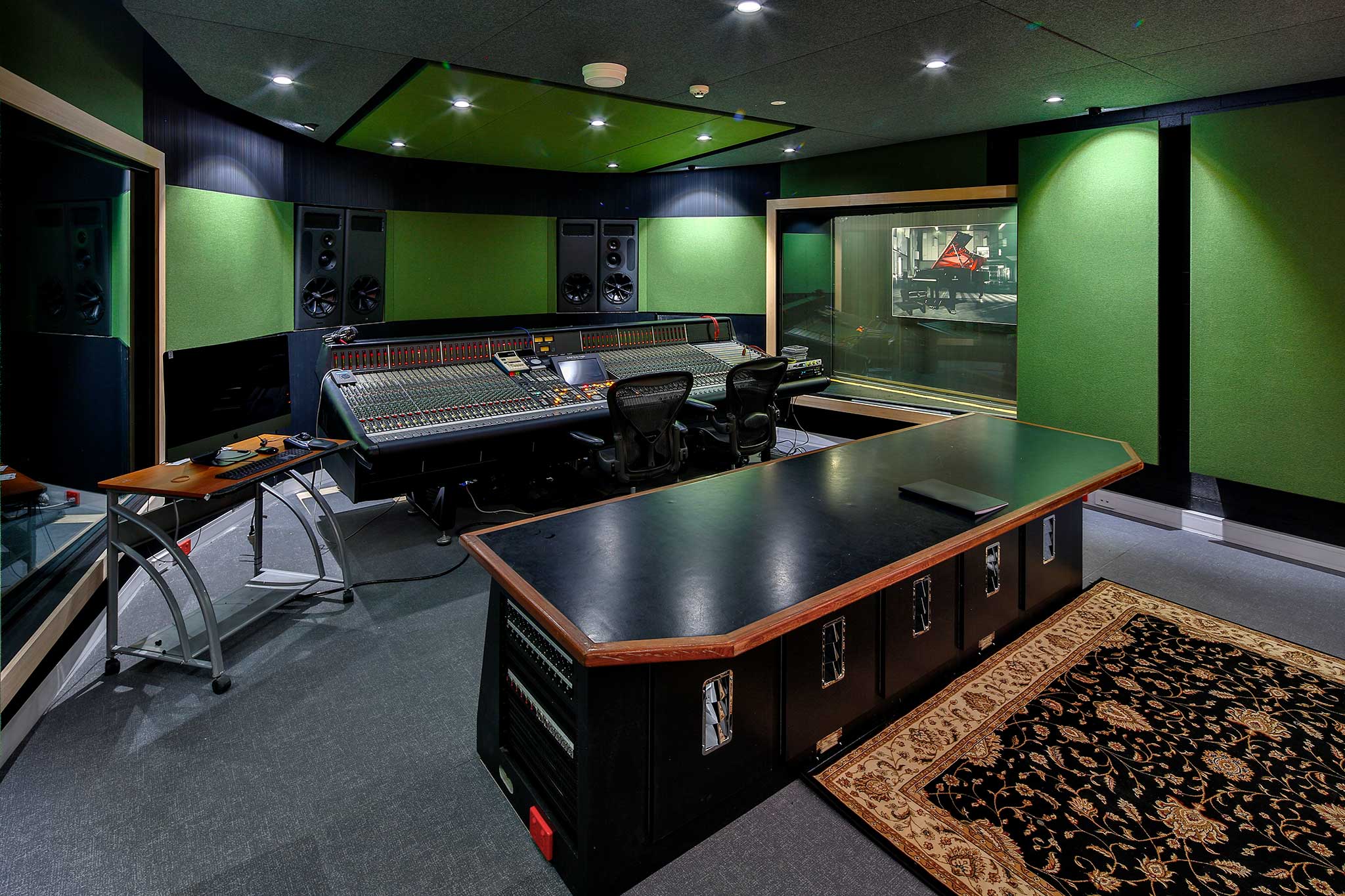
Whenever I’m working on a mix for a new client a question that frequently gets asked is “What is the best way to deliver the files for mixdown?”. Although there are no hard and fast rules, (always make sure you touch base with your mix engineer as everyone has their own personal preferences) here are some tips, from questions that I get asked, that will help prepare your track for mixdown.
Can I just send you my session file?
I always request the audio stems. (Individual bounce files of each element of the mix) Even if I am working in the same DAW as the client this is always my preference. In my experience working with session files can become too problematic.
There is a strong possibility of missing plugins/audio files
In most cases it can be difficult to navigate someone else’s session.
I prefer to start a clean session every time. This way I know exactly what is going on and can use my workflow to get my maximum results.
What sample rate/ bit depth do you want?
Another big question I hear is in regards to sample rate and bit depth. My preference for this is to have the files delivered at the same sample rate and bit depth as your original project. This way there is as little conversion as possible. Any necessary conversion can be left up to the mastering engineer. Sample rate/ bit depth is definitely is something you should check with your mix engineer first, because everyone has a different opinion and personal preference.
How do I export stems?
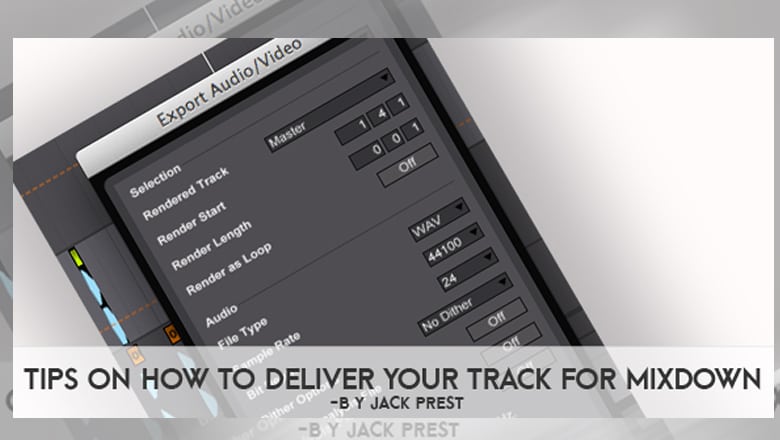
When exporting your stems always make sure that you are exporting your stereo tracks as stereo files, and mono tracks as mono files. I know this may sound simple but this is the correct way to export stems and you mix engineer will love you for it. Additionally, also be careful of your export settings and be sure not to add any normalisation or dithering. If you are not sure how to do this, I recommend doing some research or googling about the export window of your DAW and you’ll find the answers you need.
Should I leave on my effects?
Possibly the most important question I get is “Do I leave my effects on or turn them off?”. Because I work predominantly on electronic music this is particularly important as the effects can be integral to the sound of a track.
My general rule for this is as follows:
If the effect added is a part of the sound i.e. a filter sweep, phaser, sidechain or things just sound wrong without it, then leave it on.
If the effect is not integral i.e. some subtle EQ or compression, then bypass it.
If you are using auxiliary sends for reverbs or delays etc. bounce each auxiliary to it’s own stem.
I request all vocal parts to be completely raw and effect free unless there is a vocal chop/ filter effect that is key to the track.
I will then request both a set of stems with full effects and a set of stems completely dry. I want both because this way I can start my mix as close to your original production as possible and then swap out stems if any of the effects are causing issues for the online mix. I also generally request midi stems of lead, pad and bass parts so they can be easily swapped out or layered if necessary.
BPM
Finally make sure you include the BPM and key of the track somewhere with your stems. This is a small thing but will help immensely and take the guesswork out on my side. (and will show your mix engineer you care.)
Blog by Jack Prest, Producer/ Engineer at Studios 301
For enquiries or bookings with Jack please contact:
Meet our resident Electronic Music Producer and Engineer Jack Prest
With a background as a DJ, Artist and Sound Designer, Jack’s been working as an engineering and producer at Studios 301 for the past 5 years. Recently He’s been increasingly moving towardsthe role of a finisher. A producer who enters the artists process at varying stages of development (sometimes near complete, sometimes early demos) and takes it to a finished product. This process includes everything from reworking/writing lyrics and top-lines, adjusting arrangements, tracking new parts, working production and a the final mixdown ready for master.
We sat down with Jack for a quick chat about his role as a producer and what he’s been working on lately.
What do you think your main role as a producer is?
As a producer my main role is realising the vision each individual has for their work. Finding what makes it original and bringing that to the fore while also making it work sonically in the best way possible for the particular style.
Can you take us through your process of working with artists?
First step is to listen to some demos. For me I need to be able to hear an end goal from the demo or it’s not something I can work on. Then generally a chat either via phone or in the studio to discuss the work with the artist, what they are tying to achieve? where they want it to go? and why they are making it? Once we have established that we both feel like working together can be beneficial then generally we book in a production/mix session to complete one track. If everything works out well then we chat about moving on to bigger projects like an EP or an album.
How does working on other artist’s projects differ from working on your own? (If it does at all)
It’s definitely a different process. With my own work I can be completely self driven and make whatever I’m feeling. Working on other people’s records, the most important consideration is what they want to create with their art. I could take their tune and turn it into something completely different but if they don’t feel a sense of ownership and expression with the end result there there is not much point in making it.
What excited you most about the process?
I have to say the moment of completion. When someone has brought you something they have been struggling with or something they can’t fully realise and you are listening back in the studio and everyone has big smiles cause it sounds awesome. That just makes me happy.
What are some projects to look out for you have been working on?
Currently I’m working on the new Jonti record which I’m really excited about, I’ve also done some great stuff with two young up and coming producers Daily Holla, EP recently released on German Label Emprise Records, and Jerome Blaze. Both are major talents and expecting big things for them in 2016. I’m really vibing working with new artists, it gives us a great opportunity to sculpt a sound and build something together.
What’s it like working at Studios 301?
One of the great things about being at 301 is working with an amazing crew. I’ve had some great success working recently with Simon Cohen, where I take care of the production and Simon steps in to cut vocals. Working with our assistants Owen and Antonia is so valuable, their knowledge of the studios and the gear means I can focus on the sounds and the big picture and know everything will run smoothly. I’ve been writing some stuff with Antonia and keen to do more of that, she’s got some great ideas. I’d also have to mention the mastering team, I really don’t go anywhere else, Ben Feggans does a lot of my stuff, but Steve, Leon and Andrew are all jedi’s and dependent on who’s right for the project I 100% trust these guys to get the final stage right.
For more information or to enquire about booking with Jack please get in touch.
When you see Justin Bieber and Ed Sheeran’s name together you know that whatever it’s tied to is going to be big, and that’s definitely the vibe attached to arguably the biggest song in the world right now. On November 9, 2015 Justin Bieber released the ode to his ex- titled “Love Yourself”. The track co-written with Sheeran and producer Benny Blanco has received massive acclaim globally, but what you might not know is that the vocals were recorded right here in Australia, by our very own Vocal Producer Simon Cohen.
Here’s what’s gone down since the release:
“Love Yourself” has gone #1 on official charts globally including the USA, UK, Sweden, Ireland, Denmark, Australia and New Zealand.
It’s sold over 1.1 million copies in the USA alone.
It’s equalled John Lennon’s UK chart record, by being 1 of Bieber’s singles to occupy the entire top three in the UK charts. ‘
Remember Craig David? (Yep that guy who was only too happy to “fill you in” wanted to know “what your flavour was”? Well he got in on the action, covering the song for BBC 1Xtra Live Lounge – adding his own spin on it of course), a move that has seen his career reignited and his own album “Born to do It” from August 2000 back in the UK charts.
It’s the first ARIA #1 Single of 2016, and Justin’s longest running Australian single to date.
Pretty cool huh? So where do we come in on this? Great question. As mentioned, Simon Cohen our very own engineer at 301 Studios, not only has worked with Bieb’s in the past, but was hand picked to work on this project! Simon was Justin’s go to recording engineer on his recent trip to Australia in September, and well as they say “the rest is history”. So what’s it like to work with JB? How did this all come about? Well we managed to steal a few minutes of Simon’s time for a quick Q & A, so all you Belieber’s out there could get the 411.
When you were working on the track did you think it was a hit?
SC: They had told me that Ed Sheeran had co-written it, so I had high expectations of the songwriting. I got the files before I flew down to Melbourne so I had heard it a couple of times and I was singing it to myself as I was flying down thinking, “this is a great song!”. You always hope that people can hear what you hear in a song, and in this case the overwhelming fan reaction has been amazing.
It’s a point that I have spoken to a lot of people about recently. I think we are kind of going back to this amazing place where, because the playing field is leveled production wise, it’s back to who has the best idea, the strongest song. This is the perfect example as it’s literally a guitar and a vocal. Its the skeleton of a song in its purest form and it’s the one that’s connected with everyone.
Is this the biggest single you have worked on?
SC: Yes, I think its going to be hard to find anything that compares to this one. A lot of the work I have done with big name artists has been great but nothing has been as big as this single. Particularly when working with touring artists a lot if their main singles may already be done. In other cases, it might be months before anything eventuates from something you worked on and then you’re like “Oh great, that song finally came out!”.
What was it like engineering a Justin Bieber session? What was the setup?
SC: Justin works pretty fast, so as an engineer you have to get your settings as quickly as you can and it’s all about capturing that amazing performance. He has one of those very finished voices to start with, so I imagine he would sound phenomenal on just about any mic you put in front of him. But in this case it was an LA type set up, a Telefunken ELA M 251 going into a NEVE Pre and a Tube Tech CL1B Compressor. One of my favourite mics into one of my favourite pres, into one of my favourite compressors. You can’t go wrong with that chain.
This is the second time you’ve worked with Justin now. How was working with him the first time around?
SC: That was in 2014 here at Studios 301 and then they flew me to Perth too. It was all a bit up in the air, because after last time we worked together he went on a bit of a hiatus. We’d worked on a bunch of songs over a couple of different days, and the next thing I had heard, he wasn’t doing music anymore. Hopefully not because of me! (laughs)
Being a big part of such a big record. Does it change anything or the direction of where you’re headed?
SC: I think it just affirms what I have been doing and it definitely feels like I’m on the right path. Obviously number one in so many countries is a bit of a tough one to beat. Lol we’ll see.
When did it hit you, that this was actually quite massive and was something big?
SC: Probably when I started getting texts from people with screen shots of it already charting in the US even before it was released as a single. You always hope when you do a one off some with someone, that it will become their hit single. It just continued to chart and chart without any official release. It was awesome. It’s cool to hear the track playing and people know the words. You can smile knowing you were involved in that. Very humbling though. A lot of my friends seemed to be listening to it over summer! Some have even done their own covers on YouTube and I was like “Did you know I worked on that track?” I was met with a lot of “What? No Way?”. All good feedback too.
So let’s talk about covers of tracks then, what do you think about Craig David jumping on this and covering the track? Have you heard it?
SC: Haha, what a career move huh. I have to say, now that Craig David has been linked to me in some small way I think I can die a happy man. Career goals met!!
So what’s next for Simon Cohen?
SC: Hopefully just moving on to more really great records, and helping people fulfil their dreams. Hopefully soon, it might be time for a “Thundamentals” record – I’d love to be involved in that, but hey who knows. I’ve got a good feeling 2016 is going to be a big year for music. Let’s hope so!
For studios enquiries or to book Simon Cohen please contact us.
Any attempted discussion of dithering usually results in the collective groan by audio engineers everywhere; it is one of the most uninteresting and banal topics in the spectrum of audio production. However it is also one of the most common questions asked when submitting music for mastering. It is because of this that I will cover this topic, hoping to answer any of the questions that do come up.
So what is dither? A search on the Internet will very quickly tell you that dither is one of a few techniques that can be used to minimise a special type of distortion, called quantisation error. It does this by adding randomised noise to an audio signal during the process of quantisation… The three questions immediately drawn from this are:
Why would I want to add noise to my recording?
What is quantisation?
What are these errors all about?
Adding noise to your recordings?
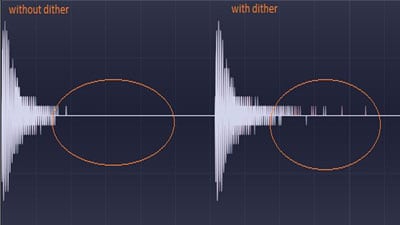
The reason we would want to add noise to your recording is really only to enhance the absolute quietest parts of the music. Imagine when a piece of music is fading out to nothing (such as the tail of a piano note), there will become a point during quantisation where for a given input there will be a result of no output (at the final quietest step, from something that is able to be heard, to nothing being able to be heard). This is an example of quantisation error, and because this is a step, anyone would hear this as an unnatural, albeit given the right playback volume.
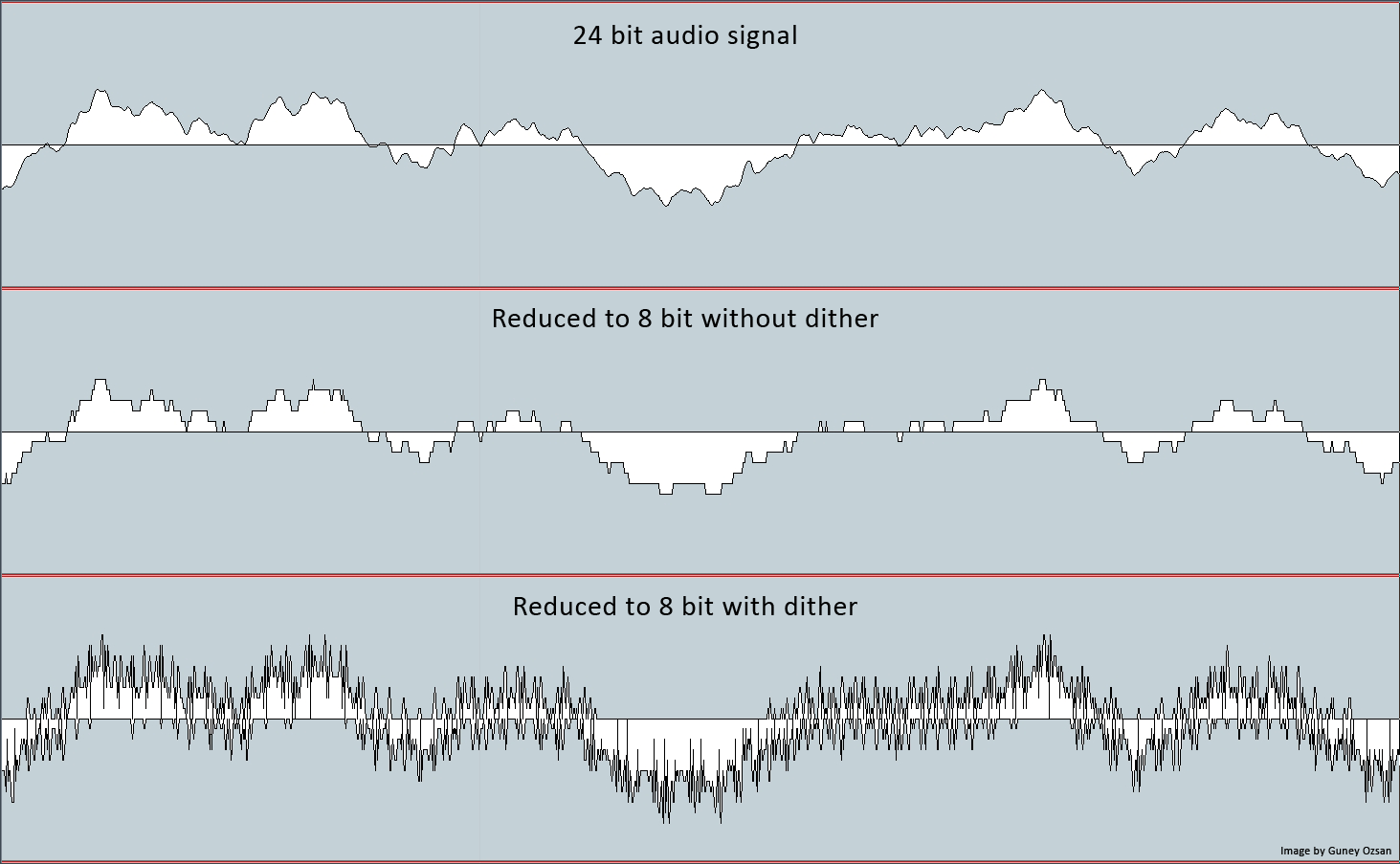
Quantisation error increases as the number of bits used to make a recording decreases. Dither in effect smooths out the inaccuracies of the recording system, by disguising the steps between different values of amplitude.
Audio bit reduction from 24-bit to 8-bit with and without dithering
Put simply, quantisation is part of the process that an audio signal will go through when being sampled and it is how a signal will be given a value for its amplitude (volume level). There are really two occasions when quantisation happens, either during conversion from an analogue waveform to a digital binary signal, or during a stage of digital signal processing.
The importance of dither is very much related to the level that a recording is made at, and hence the number of bits you use. It becomes more important with the quieter, or fewer number of bits used to encode the signal. When we make a 24-bit recording there are 2 (binary) to the power of 24 (number of bits) or 16,777,216 discrete values for amplitude that could be encoded to each digital sample. This covers an amazing 144dB of dynamic range, and really is more than you should ever need (just think that the noise floor of most equipment is around -95dBFS).
Examples of Dithering
Below are some audio examples that I have prepared to demonstrate dither and quantisation error, along with an unaffected source for you to compare.
Please note that these examples simulate recording a signal at a very low volume, to better demonstrate the quality degradation experienced when using a small number of bits to encode a signal. This issue can easily be overcome by recording at an appropriate level, which under normal circumstances, will cause the effect of dither to be far less obvious. I have created these examples by following these steps; you can recreate the same results if you follow them too:
1. Import the source audio into your DAW of choice.
2. Use a gain plugin to change the volume of the source file by -70dBFS.
3. Export the file as a 44.1kHz, 16-bit, WAV; with and without dither.
4. Import the files created in step 3 into your DAW.
5. Use a gain plugin to change the volume of these files by +70dBFS.
6. Export these two files as 44.1kHz, 16 -bit, WAV; with dither applied.
When to use Dither
So I hear you ask, when should dither be applied to my music?
The easy answer is… Whenever the audio goes through a process of quantisation. In practical terms, it means that dither should be used at the point of conversion from analogue to digital, and also it should be used at the final stage of any digital processing.
It is worth mentioning that there are many different types of dither to choose from, too many to mention here. Their differences mostly lie in their sound, some will shift their noise away from the most audible frequencies. My advice on choosing the right dither for your music is to use your ears and make a decision that is based on your own preference. They all sound different and all have a subtle effect over the sound of your music. However there is no right or wrong and it comes down to personal taste. Many people even find they prefer the sound of no dither.
Dither is applicable to mastering in the sense that it is the very last thing that will be done to a mastered audio file. For instance, if there was any change made to the file after the dither was applied (be it a fade, or a change in volume by even 0.1dB), the audio would need to be dithered again. The dither applied will then compensate for the re-quantisation the audio went through.
This brings up an interesting question regarding the use of dither on top of dither and how this relates to the accumulation of noise within the recording. The truth of this matter is quite simply, when working with 32-bit, 24-bit, and even 16-bit audio; dither noise will accumulate within your recording. However the level of this noise is so low that any reasonable amount of accumulated dither noise will not be noticeable.
Furthermore, it is important to understand that dither is less applicable to program material that is focused on high volume. In a lot of modern music (especially applicable to electronic genres) where the instruments are digital, and hence, not captured via delicately placed microphones, the focus for these sounds is usually on their texture rather than their dynamics. Dithering on a pumping bassline which has been processed with saturators and heavy compression, for example, is less audible, and even immaterial, when compared to the effects of dither to preserve a piano’s sonic integrity. In short, dither is important about ‘very quiet passages’ and has little relevance to music that is all about being loud.
Try it yourself
If you want to experiment with dithering, here is where you can try it:
If you are printing your mix through an analogue board, recording back into software at 24-bit; dither to 24-bit at the analogue to digital converter (provided you can turn this on or off on your convertor);
If you are online mixing in the box and want to export to a 24-bit file; dither to 24-bits as the absolute last process;
If you are converting between bit depths; dither to the destination bit depth;
If you decide you want to make DSP based changes (no matter how small) to an already dithered file; dither again.
Finally if there is any advice I can give to anyone – from budding audio engineers getting started, through to the most experienced engineers in the business… when it comes to dither, I would always advise using dither when it makes the music sound better. But in regards to real noticeable improvements to audio quality, there are so many things within your control that make a significantly greater difference, such as microphone choice, microphone placement, the instrument, the room, the performance or the song. All these things matter far more to the end quality of your recording.
So with the finite amount of time that everyone has to commit to any project, I stress that you spend your precious time where it matters most. If you have any questions please don’t hesitate to ask us via mastering@studios301.com
SSL and Neve are the two most recognised names in professional mixing console history. For decades, engineers and producers have debated which sounds better, which is more versatile, and which delivers the best results. The truth is that both are exceptional, but they are exceptional in different ways.
At Studios 301, our engineers have spent years working on both SSL and Neve consoles across thousands of sessions. Here is how the two flagships actually compare, from the engineers who know them best.
The Sound of SSL
SSL (Solid State Logic) consoles are known for their clarity, precision, and bandwidth. The SSL sound is often described as “clean” or “transparent,” with a wide open frequency response that allows every element of a mix to occupy its own space.
Key characteristics of the SSL sound:
Wide bandwidth. SSL channel strips handle the full frequency spectrum with minimal colouration, giving the engineer a neutral starting point. This makes SSL consoles particularly well suited to mixing, where the goal is to balance many sources without adding unwanted colour.
Defined low end. The bass response on an SSL tends to be tight and controlled rather than warm or rounded. This is an advantage in genres where low-end precision matters, such as pop, hip-hop, and electronic music.
The “SSL edge.” Many engineers describe a subtle brightness or presence in the SSL signal path. It is not harsh, but it adds a sense of definition and forward energy to a mix.
As Studios 301 mastering engineer Leon Zervos notes, the SSL sound is “less coloured” than the Neve, but it has a certain “edge” that gives mixes forward momentum.
The Sound of Neve
Neve consoles are known for their warmth, harmonic richness, and a distinctive “musical” quality that engineers often describe as three-dimensional. Where SSL aims for transparency, Neve adds colour, and many engineers consider that colour to be one of the most desirable sounds in recording.
Key characteristics of the Neve sound:
Fast transient response. Despite the warmth, Neve preamps have a very fast slew rate, meaning they capture transients openly and accurately. Engineer Mitch Kenny, who has worked extensively at Studios 301, points out that this makes Neve preamps particularly effective for tracking, where capturing the detail and energy of a live performance is critical.
Warmth and thickness. The Neve signal path introduces subtle harmonic saturation, particularly in the low mids, which gives recordings a sense of depth and weight. Leon Zervos describes the Neve 88R’s sound as “warm and thick, with a nice element of presence when the EQ is enabled.”
Transformer character. Neve microphone preamps use input transformers, which shape the signal in a way that adds musical complexity. This is a significant factor in the “Neve sound” that engineers and producers value so highly.
How They Compare: Recording vs Mixing
One of the most consistent observations from engineers who have worked extensively on both is that each console has a natural strength:
Neve for recording. The combination of transformer-based preamps, harmonic richness, and fast transient response makes Neve consoles ideal for tracking. Vocals, drums, strings, and acoustic instruments all benefit from the depth and character that the Neve signal path introduces.
SSL for mixing. The SSL’s clean signal path, wide bandwidth, and more forgiving dynamics processing make it an excellent mixing environment. When you are working with 40 or more tracks simultaneously, the SSL’s neutrality allows more to “fit” in the mix without elements fighting for space.
Engineer Jono Baker once ran the same session through both a Neve and an SSL. His conclusion: the SSL preamps sounded “muddier” by comparison for recording, while the Neve preamps were “cleaner, more detailed, and better suited to recordings where the sound needs to be as open as possible.” This was particularly evident on orchestral and acoustic material.
This is why, as producer Ivan Gough once put it, the conventional wisdom is: “Track on Neve, mix on SSL.” It is a generalisation, but it reflects the natural strengths of each platform.
SSL vs Neve: The Engineering Differences
Beyond the subjective listening experience, there are concrete engineering differences between the two console families:
Feature
SSL (e.g. 9000 series)
Neve (e.g. 88 series)
Mic preamp design
Electronically balanced, no transformer
Transformer-coupled input
Signal path character
Clean, transparent
Coloured, harmonically rich
EQ voicing
Precise, surgical
Musical, broad strokes
Dynamics section
VCA-based (punchy, aggressive)
Diode-bridge or VCA (varies by model)
Automation
Intuitive, industry-standard
Sophisticated but complex
Best suited for
Mixing, post-production
Tracking, orchestral recording
It is worth noting that the Neve sound varies significantly across different eras and models. A vintage Neve from the 1970s sounds quite different from a modern Neve 88R, and there have been several models in between with substantially different designs. In the SSL camp, the evolution from E-series to G-series to K-series has been more gradual, with the core SSL character remaining more consistent across generations.
We also asked some friends out there on their thoughts:
“Tracking on a Neve is nice and creative, SSL for mixing. Having spent many years working with Spike Stent on his G-Series with non-linear summing, it’s a revelation!”
Lee Groves, Producer/Mix Engineer
SSL vs Neve in Plugin Form
For many producers and engineers today, the SSL vs Neve question extends beyond hardware. The sonic characteristics of both console families have been meticulously modelled as software plugins, making their sound accessible to anyone working in a DAW.
Notable SSL plugin emulations:
Waves SSL E-Channel and G-Channel (channel strip)
UAD SSL 4000 E and G series
Brainworx bx_console SSL 4000 E and G
Plugin Alliance SSL Native channel strips
Notable Neve plugin emulations:
UAD Neve 1073 Preamp and EQ
Waves Scheps 73 and V-Series
Brainworx bx_console Neve 88RS
Plugin Alliance Lindell Audio 80 Series
These plugins capture the tonal characteristics of their hardware counterparts with impressive accuracy. While the experience of mixing through a physical console involves more than just the signal path (the tactile feedback, the summing behaviour, the room), plugin emulations give producers a reliable way to access the SSL or Neve “flavour” within a digital workflow.
Many professional studios, including Studios 301, use a hybrid approach that combines analog hardware with digital tools. The plugins serve as creative shaping tools in the mix, while analog outboard processing and monitoring chains provide the depth and dimension that hardware delivers.
Whether you are working with hardware or plugins, the goal is the same: finding the tonal character that serves the music. If you would like our engineers to bring that character to your recordings, explore our online mixing service or learn more about what mastering involves.
Which Console Is Right for Your Music: SSL or Neve?
The SSL vs Neve choice is ultimately about what serves the music. Here are some practical guidelines:
Consider SSL or SSL-style processing if:
You are mixing dense, multi-track productions (pop, hip-hop, electronic)
You want a clean, precise foundation that lets every element sit clearly
Your mix needs tight, controlled low end
You prefer to shape the sound surgically with EQ and compression
Consider Neve or Neve-style processing if:
You are recording live instruments (drums, strings, vocals, acoustic guitars)
You want warmth, depth, and harmonic richness in your source recordings
Your production style values character and texture over clinical precision
You are working with sparser arrangements where tonal quality is front and centre
Of course, many records use both. It is common for an album to be tracked through Neve preamps for the warmth and detail they bring to the recording, then mixed on an SSL (or with SSL-modelled processing) for the clarity and headroom the mix stage requires.
Frequently Asked Questions
What is the main difference between SSL and Neve consoles? SSL consoles are known for clarity, precision, and a transparent signal path that is well suited to mixing. Neve consoles are known for warmth, harmonic richness, and transformer-coloured preamps that excel at recording. Many engineers describe the difference as “clean vs coloured.”
Which is better for recording vocals, SSL or Neve? Most engineers prefer Neve preamps for vocal recording because of the warmth and harmonic character they add. The transformer-coupled input stage gives vocals a sense of depth and presence that many listeners find immediately appealing. That said, some engineers prefer the clarity of an SSL preamp for certain vocal styles.
Can I get the SSL or Neve sound with plugins? Yes. Both SSL and Neve channel strips have been modelled as high-quality plugins by companies including Universal Audio, Waves, Brainworx, and Plugin Alliance. While plugins do not replicate the full experience of mixing on a physical console, they capture the tonal characteristics with impressive accuracy.
Is SSL or Neve better for mixing? SSL consoles have been the industry standard for mixing for decades. Their clean signal path, wide bandwidth, and punchy VCA compression make them ideal for balancing complex mixes. Neve consoles can also be used for mixing, but their stronger tonal character means the engineer needs to account for the colour the console introduces.
Why are SSL and Neve consoles so expensive? Large-format analog consoles represent decades of engineering refinement, use premium components, and are built to professional broadcast and studio standards. A new SSL or Neve console can cost hundreds of thousands of dollars, which is why they are found primarily in major commercial studios and why plugin emulations have become such a popular alternative.
Work with Studios 301
Whether you are looking for professional online mastering with engineers like Leon Zervos and Steve Smart, online mixing, or want to discuss a recording session at our Surry Hills studio, our team brings decades of experience across every genre and format.