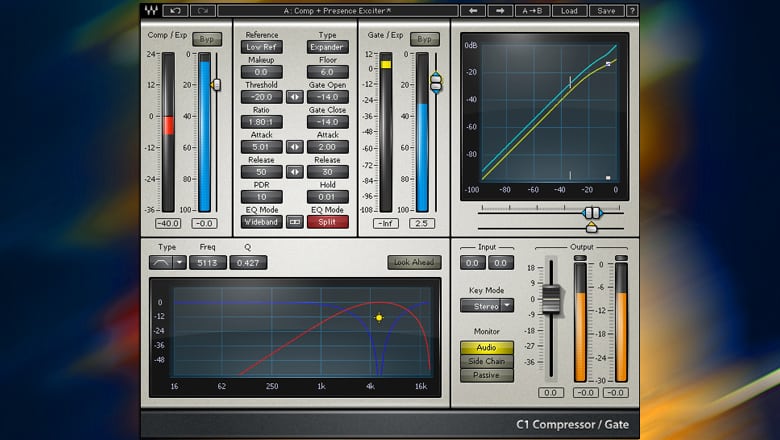
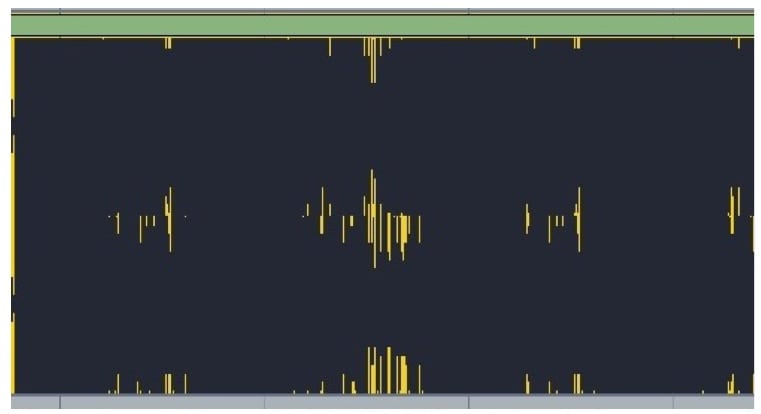
Here’s a little trick I found the other day with one of my favourite swiss army knife compressors, the Waves C1. It’s especially good for snare drums and toms. If you find your drums are a little bit too snappy, especially with a really hard stick sound, this setting can work a treat to control that snap while retaining the drum sound’s dynamics.
First, you want to set the attack and release settings as fast as possible (one of the best features of this compressor is the wide scope for adjusting attack and release times), then crank up the ratio to at least 30:1 leaving the threshold and the makeup gain at 0. If you feel the need you can play with the ratio and release time, but pretty much it’s a set and forget.
Jack Prest is an Inhouse Producer/Engineer at Studios 301
I am the Studio Philosopher and I have been enlisted by Studios 301 to share some of my thoughts and knowledge about all aspects of studio life. Much of what we do in the studio is technical, but these technical aspects are influenced and informed by less tangible qualities. Over the coming months I will provide insight into ways have thinking that may influence your studio practice or at the very least make you analyse how you work.
To begin we will appropriately start before we even get into a studio session with Preparation.
In many ways preparation is at once one of the most important and overlooked aspects of a recording or mixdown session. An engineer (or assistant) who is across all aspects of an upcoming session and has the necessary setup in place before a session starts will almost always provide for a stress-free (or at least less) and productive session.
The first key in preparation is knowing your equipment. This means before you even have a conversation with a potential client you should have an intricate knowledge of the operation of your setup, hardware and software. From a large studio to a basic laptop rig be aware of possible eventualities and troubleshoot them long before you bring anyone else into the room. This means spending the hours with your equipment and software, watching tutorials, and READING THE MANUAL!
Now that you know your setup, you’ve got a client booked and a session approaching. It is essential for you to make contact via email and/or phone to clarify exactly what the client requires. In larger environments request a tech list and room setup sheet. Even if your recording a mate in your bedroom having a clear idea of exactly what and how the want to record/mix is going to make your life easier on the day and also make you look super professional.
Once you’ve received all the technical specs and info for the session the next step is to set up your session the day/night before. This means you can troubleshoot any last minute issues (of which there is almost always at least one) without a client over you shoulder. It also means on the morning or the session, when things can get a little chaotic, you can be in a position to make minor adjustments and handle new client requests rather than doing basic setup.
This level of preparation is a bare minimum for anyone working in a large studio environment and I believe is essential no matter the size of your setup. This hard work beforehand enables you to focus on creativity and magic making during a session.
If you’ve finished recording and mixing a track, there’s one more step before it’s ready for the world: mastering. But what does mastering actually involve, and why does it matter?
Audio mastering is the final stage of music production. It’s the process of preparing a finished mix for distribution, whether that means streaming on Spotify and Apple Music, pressing to vinyl, or broadcasting on radio. A mastering engineer listens to the completed mix with fresh ears, applies corrective and creative processing, and optimises the audio so it translates well across every playback system.
At Studios 301, our mastering engineers have worked on thousands of releases across every genre, from classical and jazz to electronic and pop. Here’s what the process actually looks like.
What Does a Mastering Engineer Do?
Mastering involves two distinct phases: corrective processing and creative processing.
Corrective Processing
The corrective stage addresses technical issues in the mix that may not have been apparent in the mixing environment. Every studio room has its own acoustic character, and mix engineers make decisions based on what they hear in that specific space. This can introduce subtle imbalances that only become obvious on other systems.
Common issues a mastering engineer corrects:
Frequency imbalances (too much bass, harsh high end, muddy mids)
Stereo imbalance or phase problems
Inconsistent dynamics (sections that jump in volume unexpectedly)
Unwanted noise, hum, or digital artefacts
Lack of definition in the low end
Buried vocals or instruments
The tools used at this stage include EQ, compression, multiband compression, stereo imaging, and limiting, applied with a light touch. The goal is not to alter the mix, but to polish it so it sounds its best across a wide range of playback systems, from studio monitors to phone speakers.
Creative Processing
This is where the mastering engineer’s personality comes into play. Every engineer has their own aesthetic sensibility, their own sense of what makes a record feel finished. Some favour warmth and weight; others lean towards clarity and air.
The creative stage is a conversation between the artist’s vision and the engineer’s experience. A great mastering engineer enhances what’s already there, bringing out the qualities that make a record special. This is also why many artists develop long-term relationships with a particular mastering engineer: they find someone who understands their sound.
Mastering for Streaming in 2026
One of the biggest changes in mastering over the past decade has been the shift towards streaming platforms. Each major platform applies loudness normalisation, which adjusts the playback volume of every track to a consistent level. This has significant implications for how music should be mastered.
Current loudness targets by platform:
Platform
Loudness Target
True Peak Limit
Spotify
-14 LUFS (integrated)
-1 dBTP
Apple Music
-16 LUFS (with Sound Check)
-1 dBTP
YouTube
-13 to -14 LUFS
-1 dBTP
TIDAL
-14 LUFS
-1 dBTP
Amazon Music
-14 LUFS
-2 dBTP
What this means in practice: if your master is louder than the platform’s target, it will be turned down during playback. If it’s quieter, it will be turned up (within limits). This means that crushing a master to be as loud as possible, which was common during the “loudness war” era, no longer provides a competitive advantage on streaming platforms. In fact, it can make your music sound worse, because heavily limited tracks lose dynamics and clarity when turned down by the normalisation algorithm.
A well-balanced master in the range of -14 to -9 LUFS (depending on genre) with true peaks below -1 dBTP will translate well across all major platforms.
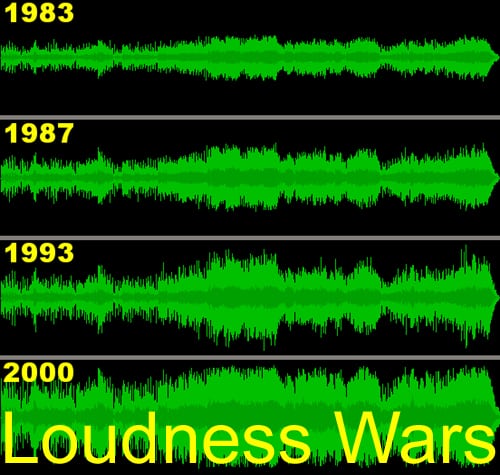
The desire to make records sound louder than the competition has existed since the days of vinyl. Known as the “loudness war”, this arms race accelerated through the CD era and peaked in the early 2000s, when many records were mastered at extreme levels that sacrificed dynamics for sheer volume.
The psychoacoustic reason is simple: when two recordings are played side by side, the louder one almost always sounds “better” to the listener (up to a point). This incentivised labels, DJs and radio stations to push for ever-louder masters.
Digital recording removed the physical limitations of vinyl and tape, making it technically possible to push levels even further. But the tradeoff was clear: overly limited masters sounded “squashed”, flat, and fatiguing. The music may have been louder, but it lost the dynamics and punch that made it feel alive.
Streaming normalisation has effectively ended the loudness war. When every track is played at the same perceived volume, there’s no advantage to being louder. The focus has shifted back to dynamics, clarity and musicality, which is exactly where mastering should be.
How Online Mastering Works
At Studios 301, we offer online mastering for artists and labels worldwide. The process is straightforward:
Upload your files. Submit your finished mixes through our online portal, along with any notes on your preferences (reference tracks, loudness targets, format requirements).
Our engineers master your tracks. Your music is mastered on the same equipment, and by the same engineers who have worked on thousands of major label and independent releases.
Review and approve. You receive your mastered files back (typically within a few business days).
Online mastering removes the need to travel to a studio while delivering the same professional results. Whether you’re in Sydney, London, or Los Angeles, you get access to the full Studios 301 mastering team.
How to Prepare Your Tracks for Mastering
Before sending your finished mixes for mastering, there are a few important steps to follow. Getting this right ensures the mastering engineer has the best possible material to work with.
Your checklist:
Remove limiting from the master bus. If you’ve been mixing through a mastering chain (such as iZotope Ozone or T-RackS), turn off the final limiter before bouncing. Leave any other processing that shaped your mix balance, but remove the brickwall limiting stage.
Check your levels. After removing the limiter, play back the loudest section of the track and make sure no signal exceeds 0 dB. Pull the output level down if needed to leave headroom.
Bounce at the project sample rate and 24-bit. Whether your session is at 44.1kHz, 48kHz, or 96kHz, bounce at the native sample rate. Always use 24-bit (not 16-bit) to preserve dynamic range.
Include reverb tails. Make sure your bounce extends past the end of the last audible sound, including any reverb or delay tails that ring out.
Label your files clearly. Include the track number, song title, and version (e.g., “01_SongTitle_Mix_v3.wav”).
What your waveform should look like:
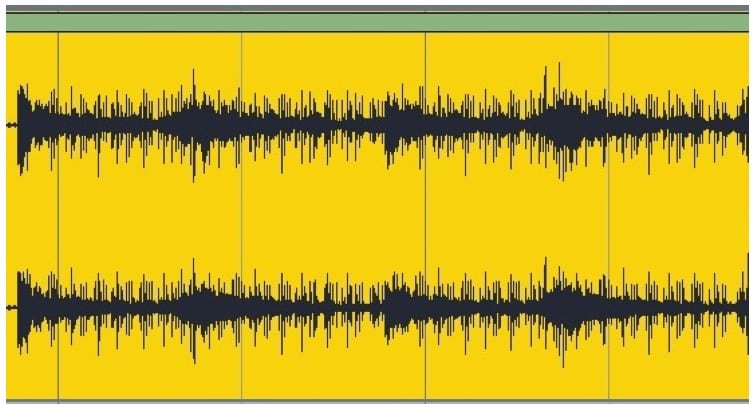
You want visible peaks and valleys in the waveform, showing natural dynamics. If the waveform looks like a solid rectangle (a “brick”), the mix has been over-limited and leaves very little room for the mastering engineer to work.
You do not want this, which resembles a brick:
this is an example of an overlimited waveform.
A mix with healthy dynamics gives the mastering engineer the space to apply both corrective and creative processing. An over-limited mix is like handing someone a finished product and asking them to improve it: the options are severely restricted.
How to Choose a Mastering Engineer
Choosing the right mastering engineer is an important decision. Here are a few things to consider:
Listen to their previous work. Our mastering engineers have credits or a portfolio you can review. Pay attention to whether their work sounds the way you like within your genre.
Consider the relationship. Mastering is a collaborative process. An engineer who understands your style will deliver great results.
Understand the turnaround. For time-sensitive releases, confirm the expected delivery timeline before booking.
What is audio mastering? Mastering is the final stage of music production, where a finished mix is polished, balanced and optimised for distribution. A mastering engineer applies corrective processing (fixing technical issues) and creative processing (enhancing the overall sound), then formats the audio for the intended release platform.
How much does mastering cost? At Studios 301, mastering is priced per track or per album. Contact us for a quote based on your project. Online mastering is available for artists and labels worldwide.
Do I need mastering if I’m only releasing on Spotify? Yes. Streaming platforms apply loudness normalisation, but they don’t correct frequency imbalances, phase issues, or dynamics problems. Professional mastering ensures your music sounds its best on every platform and every playback system.
What’s the difference between mixing and mastering? Mixing is the process of balancing and processing individual tracks (vocals, drums, guitars, etc.) into a stereo mix. Mastering takes that finished stereo mix and prepares it for release, addressing overall tonal balance, dynamics, loudness and format-specific requirements.
How loud should my master be for streaming? Most streaming platforms normalise playback to around -14 LUFS. A master in the range of -14 to -9 LUFS (depending on genre) with true peaks below -1 dBTP will translate well across all major platforms.
Should I master my own music? While it’s technically possible, professional mastering brings a fresh perspective, a calibrated listening environment, and specialised tools and experience. An impartial set of ears on your music can reveal issues that are difficult to hear after spending weeks mixing.
Get Your Music Mastered at Studios 301
Ready to take your mixes to the next level? Studios 301 offers professional online mastering for artists, producers and labels worldwide.
You’ve seen them around at Studios 301 — they’ve helped load in your session, grabbed your late night coffees, tracked down that special piece of gear – they’ve even flipped your burgers at some of our courtyard BBQ’s.
Our interns are a special blend of talent and ambition, so it comes as no surprise to see each of them taking off with exciting new projects and very promising careers. We caught up with a few of our past interns-turned engineers / songwriters / audio school teachers / musicians and more, to hear what they’re up to now and how their time at 301 helped pave the way.
– Wade Gilmour has set up a recording studio at Belmore Boys High School for educational and private use, as well as started a small record label focusing on short runs of vinyl and digital releases for local artists. He has also begun teaching the Audio Engineering course at JMC Acadamy on a full time basis and continues to work as a freelance engineer, doing both live sound and session work.
– Jarrah Nelson was scouted to assist in managing the world’s first Ableton-dedicated training company, Liveschool. Building on a successful brand, he helped develop the business and expand its reach. He says, “The experience I gained at 301 opened my eyes to the in’s and out’s of not only the music industry, but working in a close knit, team oriented environment. This was crucial to my job at Liveschool.” Jarrah has also partnered with a friend from Uni to do freelance audio consulting and production, recording various solo artists and cover bands and providing them with material for their demos and sites. Jarrah also assists with audio installation at Soho Bar in Kings Cross.
– As a result of his hard work and a succesful internship, Mike Macias was fortunate enough to go on to work with G.Simone, spouse of hip-hop legend, KRS-One. He wrote music, recorded, mixed and edited for Simone which he says was “great fun.” Mike also does live audio for gigs across town and plays his own studio-recorded material live in Sydney. As for the future? “Next year I plan to go back to studying and take a course in post-production film, or even composition and editing audio for gaming.” Mike says most of the techniques he learned at 301, he now incorporates into his work at his home studio – “not just on the technical side, but also working with the artists and making them feel as comfortable as possible to capture a great performance.” Check out Mike’s music project, MicMac here.
– Simon Chisholm has continued volunteering his time at 301, gaining invaluable knowledge and experience in the technical workshop under the mentorship of Technical Director Stephen Crane and Rick Taylor. His tasks include helping to fix faulty equipment and building new pieces of gear, both for the studio and himself. He continues to take on freelance projects at 301 and has recently been hired as a Tape Transfer Engineer, whereby a client’s old analogue or digital tapes are recorded to a more modern digital format. Simon notes, “My time spent at Studios 301 has enhanced my skills and operational knowledge when working as Audio Director in outside broadcasts.”
What advice do they have for finding your footing, post-internship? 301’s studio assistant and former intern Jono Baker says, ” Be willing to work hard and commit to what you see as your potential career. Make the most of your opportunities at hand. The more you put in, the more you get out.”
For more information on the internship opportunities available at Studios 301, contact interns@studios301.com.